Resume Keywords: How to Find and Use Them for Any Role
Resume keywords are the words a recruiter, or the software they use, searches for when deciding which applications to open: mostly job titles and the skills, tools and credentials a job asks for. The place to find them is the job description, and that is no longer just advice. Two applicant tracking vendors now generate the recruiter's search terms and screening criteria from the posting itself. Write each keyword in the posting's exact form, put a line of proof next to it, and stop. Nothing in the vendors' own documentation rewards repeating a keyword, and a 2026 study of about 200,000 real resumes shows that people do hide them, and that hidden text can be detected.
This post is the keyword method on its own. If you want the full edit, start with tailoring your resume to the job description; if you want the system behind it, read what an ATS actually does, and what really triggers an automatic rejection.
What are resume keywords?
A resume keyword is any word or phrase that someone screening applications would type into a search box or set as a filter to find people like you. That definition matters, because it tells you which words count. "Hard-working" counts for very little. It's hard to picture a recruiter typing it into a search box.
The vendors are specific about what does get searched. Greenhouse's talent filtering tells recruiters to begin "by searching for job titles, skills, locations, and other keywords in the full text of resumes and internal notes." Its AI matching product is set up with "required skills, relevant experience, job titles, and (optionally) industry," according to the Talent Matching FAQ.
So in practice your keywords fall into four kinds:
- Job titles: the title in the posting and the common variants of it.
- Skills and tools: software, methods, and the hard skills the role runs on.
- Credentials: licenses, certifications, degrees.
- Location: where you are, or where you can work.
Soft skills are the weakest search terms of the lot. They're easy to claim and hard to search for, so show them in bullets instead.
Why the job description is the place to look
Most guides tell you to mine the posting. Here is the reason, from the people who build the software.
Greenhouse offers recruiters keyword suggestions: "Suggestions are generated based on the job description," and they appear inside talent filtering, where a recruiter can add them as filters with a click. Ashby did the same thing for its AI screening in 2024. Its auto-generated job criteria are "Suggested criteria based on the job description you've written." Greenhouse's Talent Matching assistant, per the same FAQ, uses the job post to "draft an initial setup before you type anything."
Read that from the applicant's side. The posting you're looking at is very often the first draft of the search that will be run against your resume. The words in it are the words most likely to come back as filters.
ATS keywords: how the matching actually works
Here the advice online stops agreeing. Popular guides contradict each other: one says some systems won't recognize synonyms, another says to use several. Indeed's resume keywords guide says systems "count and rank applications based on keyword frequency and placement," without a source. None of them quotes a vendor.
The vendors document it themselves, and they don't all behave the same way:
| Feature | How it matches | What it means for you |
|---|---|---|
| Greenhouse talent filtering and Talent Rediscovery | "The keyword from your search must exactly match the keyword in the application." Required terms work as AND, preferred terms as OR | The posting's exact wording. A synonym is a miss |
| Greenhouse Boolean search | Quotation marks keep a phrase "intact in the exact word order stated." Recruiters use OR to cover synonyms themselves | Keep multi-word terms together: "accounts payable," not "payable accounts" |
| Workable's default candidate search | "Fuzzy matching is applied in search terms by default," so "Tom" can return "Tim" or "Tomas." Quotes force an exact match | Catches near-spellings. Nothing in the documentation says it links two different terms with the same meaning |
| Greenhouse Talent Matching (AI) | Compares "related terms on each resume to the calibrated skills," and several terms can map to one skill, so more matched terms don't always raise the match score | Synonyms can count here. Repetition doesn't help |
| Ashby AI-Assisted Application Review | The AI reads each resume "trying to find evidence" that a criterion is met, and reviewers "always see the AI output along with citations" | The keyword has to sit in a sentence that proves it |
You can't see which of these an employer has switched on, and a single vendor can offer several of them. What survives all of them is narrow: the posting's own term, spelled the way the posting spells it, inside a line that shows you did the thing. Exact filters and fuzzy search both find it, and an AI matcher finds the evidence beside it.
As for frequency: the keyword filters above are yes-or-no tests, and the one vendor here that describes how its AI ranker treats a long list of matches says the list doesn't always raise the score.
How to find keywords for a resume: the keyword ledger
This is the method. The first one is slow; after that you end up with a short table, a ledger, that you can reuse for every similar job.
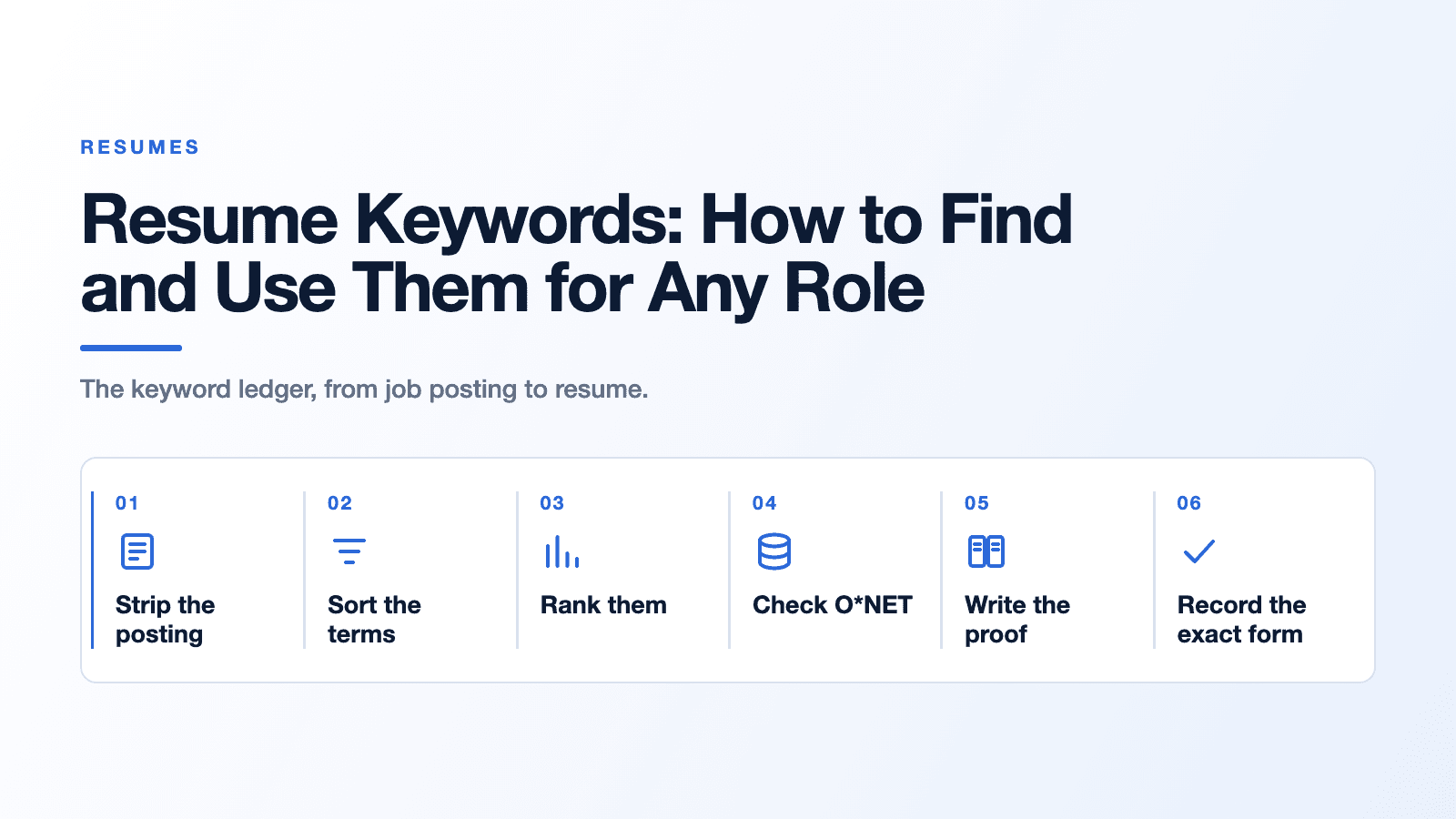
1. Strip the posting to its requirements
Paste the posting into a blank document. Delete the company story, the benefits, the equal-opportunity statement and any line about a "dynamic team." What's left is usually two lists, often labeled requirements and nice-to-haves, plus a paragraph of duties.
2. Sort every term into one of the four kinds
Go line by line and pull out each job title, skill or tool, credential and location. Write them as the posting writes them. If it says "QuickBooks Online," don't write "QuickBooks." If it says "AP/AR," note that too.
Work authorization, and often location, also arrive as questions on the application form, and that's where the automatic rejections the vendors document actually happen. Answer those carefully. They aren't a keyword job.
3. Rank by where each term sits
A term in the requirements list outranks one in the nice-to-haves. A term that shows up in both the duties paragraph and the requirements outranks a term mentioned once. Give the job title a top spot, since it's named in both of Greenhouse's documented setups above. Mark your top five to eight.
4. Check the occupation in O*NET
None of the popular keyword guides we read mentions this step, and it's free. O*NET is the US Department of Labor's occupation database. For each occupation it flags software as In Demand, which O*NET defines as "frequently included in employer job postings for this occupation," and as a Hot Technology, one of the "requirements most frequently included across all employer job postings." Employer job postings are one of the primary sources for those flags, according to O*NET's own methodology paper, and the flags were designed to be updated twice a year.
To use it, go to onetonline.org, type the job title into the occupation search, open the closest match and scroll to its software skills, where Hot Technology items are labeled and a link lists the In Demand ones. Then compare that list to your ledger:
- A tool in both is role-standard. It belongs on your base resume, as well as the tailored copy.
- A tool in the posting but not flagged is probably this employer's own setup. Include it if it's true, and don't be surprised when the next posting doesn't ask for it.
- A flagged tool missing from the posting is worth a second look at your resume anyway, because other employers hiring for the same job are asking for it.
Don't skip the boring ones. We counted the flags across O*NET's 31.0 software skills data, released in August 2026: of the 923 occupations with software listed, 495 have at least one In Demand tool, and Microsoft Excel is flagged In Demand for 339 of them, more than any other single application. People leave Excel off because it feels too obvious to mention. The federal data says employers in 339 occupations ask for it often enough to earn the flag.
The same O*NET page lists a sample of job titles that people in the occupation report holding, and the full database has many more. That's your list of title variants.
5. Write the proof next to each term
For every term you kept, write one line of evidence from your own work: a project, a number, a system you ran. If you can't write that line, the keyword doesn't go on your resume. This is the same two-column match map we walk through in the post on tailoring, so if you've built one, you've done this step.
6. Record the exact form
Last column: how the word should appear on the page.
- The posting's spelling, because an exact filter needs the same word.
- The acronym and the spelled-out form together, once: "accounts payable (AP)," "Certified Public Bookkeeper (CPB)." A recruiter's filter might use either.
- Multi-word terms kept intact. A phrase search for "month-end close" won't match "closed the books at the end of each month."
A worked example: one bookkeeper posting, start to finish
Here's the ledger for an illustrative posting (the posting and the proof lines are invented for teaching; the O*NET flags are real). The job: Full Charge Bookkeeper. Required: full-cycle accounts payable and accounts receivable, bank and credit card reconciliations, month-end close, QuickBooks Online, advanced Excel. Preferred: NetSuite, 1099 reporting.
| Term (as written) | Kind | O*NET 31.0 for bookkeeping clerks | Your proof (illustrative) | Where it goes |
|---|---|---|---|---|
| Full Charge Bookkeeper | Title | One of O*NET's job titles for the occupation | Your current role covers the full cycle | Headline, if it's honestly your level |
| QuickBooks Online | Tool | QuickBooks flagged In Demand | Ran QuickBooks Online for a 40-person company | Skills section and one bullet |
| Excel | Tool | Flagged In Demand | Built the monthly accrual workbook | Skills section and one bullet |
| accounts payable (AP) / accounts receivable (AR) | Skill | Accounts Payable Clerk and Accounts Receivable Clerk among reported titles | Processed about 300 invoices a month | Bullet, both forms once |
| month-end close | Skill | Not a software item | Cut close from eight days to five | Bullet, phrase intact |
| NetSuite | Tool | Listed, not In Demand | None | Leave it off |
| 1099 reporting | Skill | Not a software item | Filed vendor 1099s each January | Bullet |
Look at the NetSuite row. It's a preferred skill, it's a real tool in this occupation, and the honest move is to leave it out. A filter for it was always going to miss you, and an interviewer who asks about it will find out fast. Seven terms in, six kept, every one attached to something you can talk about for two minutes.
Where to put keywords on a resume
Each kind of keyword has a natural home:
- Headline or title line. The posting's job title, or the closest honest version. Both Greenhouse setups above search or calibrate on job titles.
- Skills section. Tools and hard skills, in their exact form, no adjectives.
- Experience bullets. Every top-ranked keyword appears again here, inside a sentence with a result. Ashby's AI looks for evidence and shows the recruiter its citations, and keyword search shows a snippet too: Greenhouse displays "a small snippet under their name" showing how the search terms are used, and Lever shows the matching text "as well as surrounding text" in its search results. The bullet is what the recruiter reads next.
- Certifications. Full name and acronym.
One placement warning: don't park keywords in a page header, footer or text box. Whether the parser reads those at all is a format question, and it's covered in our guide to how to keep the file itself readable.
How many keywords should a resume have?
No vendor publishes a number, and the documentation explains why there can't be one. The keyword filters are set by a recruiter, job by job, and they test whether a term is present. Greenhouse's AI matcher says outright that a longer list of matched terms doesn't always mean a higher score. Any percentage you've been shown most likely came from a third-party checker, not from the employer's system.
A workable rule: every required term you can prove, once in the skills section if it's a tool or hard skill, and once in a bullet with evidence. That's usually a short list. If a sentence exists only to hold a keyword, cut it.
Keyword stuffing and white text: what the 2026 data shows
The old trick is to paste the job description into your resume in white text, so software reads it and people don't. Researchers from UNC Chapel Hill, Duke, Arizona State, UC Berkeley and the recruiting platform hireEZ measured how often people actually do it. In a study of about 200,000 real resumes collected by hireEZ over several years, posted in May 2026, roughly 1% contained hidden prompt injections, meaning text hidden from human readers but readable by software, and the share had risen noticeably over the previous one to two years. More than 90% of those injections weren't instructions to an AI at all. They were hidden data, such as skill lists in text colored to match the background.
The same paper shows that this content is detectable: the authors' detection methods flag text that is hidden from people but present in the extracted text, whether it reads as an instruction or as harmless professional keywords. One recruiting platform's data isn't every employer's experience, but it's a measured result, which is more than the trick ever had.
Two more reasons it backfires, both from the vendor documentation above. The search results recruiters see show the matched words in context, so a hit from a hidden list comes with no sentence around it. And the AI matcher that maps related terms to one skill gives no documented credit for a longer list. Visible stuffing fails for the same reason, minus the risk of looking like you tried to fool someone.
Check your resume with the find test
Before you send it:
- Save your resume, open it, select all, and paste it into a plain text editor. Roughly speaking, that plain text is what a keyword search runs over.
- Use find (Ctrl+F or Cmd+F) for each term in your ledger, in its exact form.
- For every miss you can honestly prove, add it.
- For every hit, read the dozen words around it. That's close to the snippet a recruiter sees. If the words around it are a comma-separated list, add the term to a bullet as well.
That's the whole check. It costs nothing and it's closer to what the software does than any match score.
Where JobMason fits
If you're applying to a lot of roles, building a ledger for each one by hand gets old. JobMason reads the actual posting from a job link and drafts a tailored resume, cover letter, hiring-manager email and answers to the application questions, which you edit before you export. The application tracker and all 12 resume templates are free, with no card and no expiry; the AI generation is the part you pay for. It does the drafting. The proof column is still yours. And if you're rethinking the wider search beyond the resume, our job search tips for 2026 cover the rest.
Frequently asked questions
How many keywords should a resume have? There's no published number, and no vendor documents a threshold. Include every required term from the posting that you can back with real experience, once in your skills section and once in a bullet that proves it.
Should I copy keywords exactly from the job description? Copy the terms, in their exact spelling, wherever they're true of you. Greenhouse's talent filter needs the keyword in your application to exactly match the recruiter's search term. Don't copy sentences, and don't copy skills you don't have.
Do applicant tracking systems understand synonyms? Some features do and some don't. Greenhouse's AI matching maps related terms to the same skill, Workable's search is fuzzy by default, and Greenhouse's keyword filter requires an exact match. Since you can't tell which one an employer uses, write the posting's term and add a synonym only where it reads naturally.
Does hiding keywords in white text work? It's a bad bet. A 2026 study of about 200,000 real resumes found hidden text in roughly 1% of them and showed it can be detected automatically, and recruiters' search results show matched words in context, where a hidden list stands out.
Where do I find resume keywords if the job posting is vague? Look up the occupation in O*NET, the US Department of Labor's free occupation database, and note the tools flagged In Demand, which O*NET defines as frequently included in employer job postings for that occupation. Then read two or three other postings for the same title and keep the terms that repeat.
The one thing to do with your next posting
Open the posting and build the ledger: term, kind, proof, exact form. Then run the find test on your resume. Resume keywords are the employer's own words handed back with evidence attached. Use the posting's spelling, and keep the proof in the same sentence as the word.
Sources
- Greenhouse keyword suggestions are generated based on the job description and appear in talent filtering, where a recruiter can add them as filters with a click.
- Ashby (October 1, 2024): auto-generated criteria for AI-Assisted Application Review are suggested based on the job description the employer wrote.
- Greenhouse talent filtering searches job titles, skills, locations and other keywords in the full text of resumes and internal notes, and the search keyword must exactly match the keyword in the application.
- Greenhouse Talent Rediscovery searches past applicants and prospects with the same exact-match keyword rule; required keywords act as AND and preferred keywords as OR.
- Greenhouse Boolean search keeps a quoted phrase intact in the exact word order stated, and recruiters use OR to cover synonymous terms.
- Workable (snapshot 2026-06-10): fuzzy matching is applied to search terms by default, and quotation marks request an exact match.
- Greenhouse Talent Matching compares related terms on each resume to the calibrated skills, several terms can map to one skill, and a longer list of matched terms does not always mean a higher match score. It does not auto-reject candidates.
- Ashby (September 10, 2024): the AI reads each resume looking for evidence that the candidate meets each criterion, and reviewers always see its output with citations.
- O*NET defines In Demand skills as frequently included in employer job postings for an occupation and Hot Technologies as requirements most frequently included across all employer job postings.
- O*NET (November 2022): employer job postings are a primary source for technology skills, and the Hot Technology and In Demand designations are updated twice annually.
- O*NET 31.0 (August 2026) software skills data: 495 of 923 occupations have at least one In Demand tool, and Microsoft Excel is In Demand for 339 occupations (JobMason count). For bookkeeping clerks the In Demand tools include QuickBooks and Excel.
- Greenhouse full text search shows a small snippet under each candidate's name showing how the search terms are used in their profile.
- Lever (snapshot 2025-10-15): search results show snippets of text that match the search query, as well as surrounding text.
- Zhang et al. (May 2026): in about 200,000 real resumes collected by hireEZ, roughly 1% contained hidden prompt injections, more than 90% of them hidden data such as skill lists rather than instructions, and such content is detectable.
- Indeed's resume keywords guide (updated June 16, 2026) states, without a source, that systems count and rank applications by keyword frequency and placement.